
트위치 드롭스는 좋아하는 스트리머의 방송을 시청하는 것만으로 무료 게임 보상을 얻을 수 있는 가장 인기 있는 방법 중 하나로 빠르게 자리 잡았습니다. 희귀 스킨과 꾸미기 아이템부터 특별 이벤트 아이템까지, 드롭스는 일반적인 트위치 시청을 실질적인 게임 혜택으로 바꿔줍니다. 하지만 많은 사용자들이 드롭스가 지급되지 않거나, 인벤토리에 나타나지 않거나, 시청 시간이 제대로 반영되지 않는 등의 불편한 문제를 겪고 있습니다.
이 가이드에서는 트위치 드롭에 대해 알아야 할 모든 것, 즉 작동 방식, 실패하는 일반적인 이유 및 실행 가능한 해결 방법을 다룹니다.
1. 트위치 드롭스란 무엇인가요?
트위치 드롭스는 공식 게임 내 보상 게임 개발자들이 특별한 트위치 캠페인이나 이벤트 기간 동안 시청자들에게 배포하는 아이템입니다. 스트리머가 드롭스 이벤트에 참여하면 시청자들은 방송을 시청하는 것만으로도 보상을 받을 수 있습니다.
트위치 드롭스의 주요 특징:
- 무료 리워드 대부분의 드롭은 시청자에게 완전히 무료입니다.
- 시청 시간은 중요합니다 특정 시청 시간을 달성하면 보상이 잠금 해제됩니다.
- 계정 연결이 필요합니다 드롭스를 받으려면 Twitch 계정을 게임 계정에 연결해야 합니다.
일반적인 보상 유형은 다음과 같습니다.
- 캐릭터 스킨 또는 의상
- 무기 또는 장비 외형
- 전리품 상자 또는 팩
- 이벤트 화폐 또는 자원
- 한정 기간 판매 상품
트위치 드롭스는 개발자들이 새로운 게임 콘텐츠, 이벤트 및 업데이트를 홍보하는 동시에 시청자의 참여를 유도하고 스트리머를 지원하는 방법입니다.
2. 드롭이 있는 인기 트위치 게임
많은 인기 게임들이 정기적으로 트위치 드롭스 캠페인에 참여합니다. 가장 자주 등장하는 게임들은 다음과 같습니다.
- 포트나이트 – 감정표현, 스프레이, 랩, 이벤트 꾸미기 아이템
- 가치 평가 - 요원 스킨, 무기 장식, 이벤트 아이템
- 콜 오브 듀티 - 무기 설계도, 오퍼레이터 스킨, 경험치 보너스
- 터미널 여단 – 캐릭터 꾸미기 아이템 및 이벤트 보상
- 마블 라이벌즈 – 영웅 스킨, 배너, 경험치 부스트
- 듄: 어웨이크닝 – 생존 장비, 장식품 및 얼리 액세스 아이템
- 헌트: 쇼다운 – 전설 무기, 스킨, 그리고 혈족 결속
- 씨 오브 시브즈 – 화장품, 감정표현, 애완동물, 의상 세트를 배송하세요
3. 트위치 드롭스는 어떻게 작동하나요? ?
트위치 드롭스는 캠페인 기간 동안 시청자 참여도를 추적하는 간단한 시스템을 통해 운영됩니다. 이 시스템의 작동 방식을 이해하면 대부분의 일반적인 문제를 예방할 수 있습니다.
3.1 캠페인 시작
게임 퍼블리셔가 드롭스 시스템을 활용한 이벤트나 프로모션을 시작합니다. 새로운 시즌, 업데이트 또는 특별 협업 등이 이에 해당될 수 있습니다.
3.2 스트리머 참여 선택
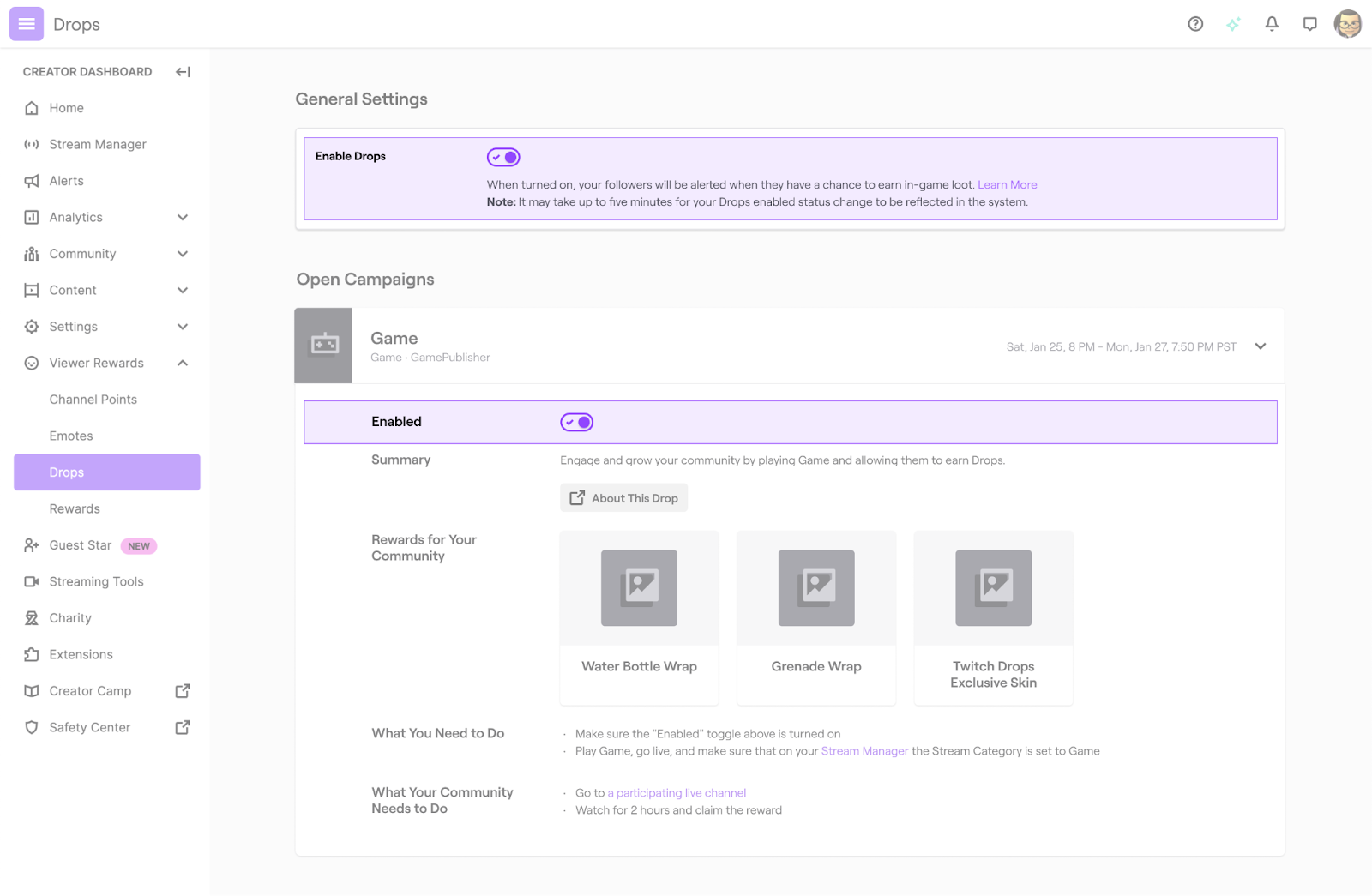
캠페인에 참여하고 드롭 기능을 활성화한 채널만 보상을 배포할 수 있습니다. 다음을 확인하세요. "드롭 활성화됨" 스트림에 태그를 추가하세요.
3.3 시청자가 스트림을 시청합니다
Twitch는 로그인한 시청자의 시청 시간을 자동으로 추적합니다. 수동으로 할 일은 없지만, 시청 시간이 정확하게 집계되도록 Twitch 탭을 활성화 상태로 유지해야 합니다.
3.4 시청 시간 요건 충족
각 보상 단계마다 특정 시청 횟수가 필요합니다. 예를 들면 다음과 같습니다.
- 30분 → 1단계 보상
- 1시간 → 2단계 보상
- 2시간 → 3단계 보상
3.5 보상을 받으세요
일부 드롭은 자동 청구됨 반면 다른 앱들은 수동으로 클릭해야 합니다. 주장하다 트위치 인벤토리에 있습니다.
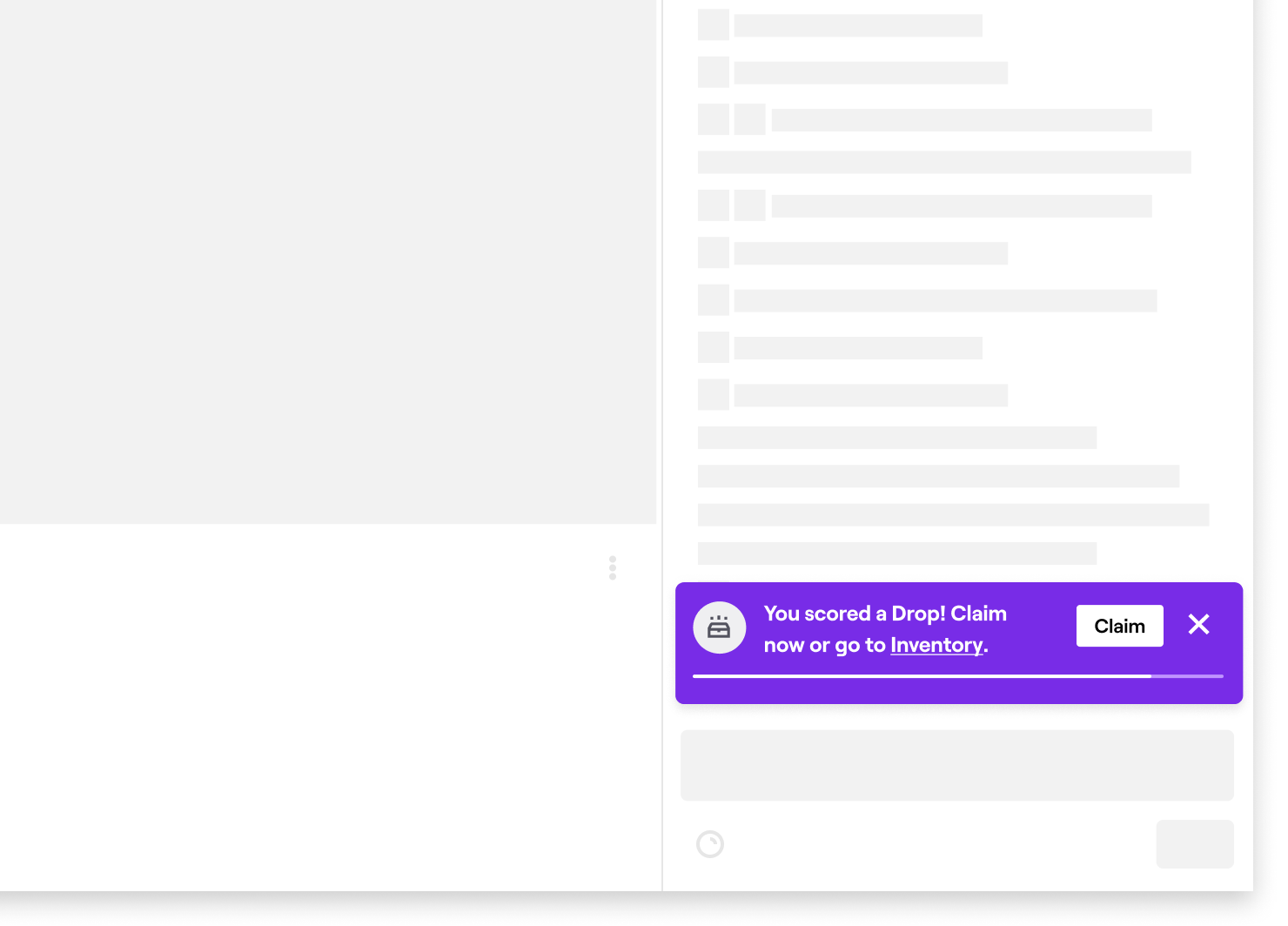
3.6 게임 내 계정으로 받기
보상은 연동된 게임 계정으로 지급되며, 게임에 따라 즉시 또는 몇 시간 내에 지급될 수 있습니다. 일부 게임의 경우 특정 조건을 충족해야 합니다. 게임을 다시 시작하세요 보상을 보기 위해.
4. 해결 방법 트위치 드롭이 작동하지 않나요?
모든 단계를 따랐는데도 보상이 지급되지 않는다면, 일반적으로 다음 해결 방법을 시도해 보세요.
4.1 수표 계좌 연결
트위치 계정과 게임 계정이 올바르게 연결되어 있는지 확인하세요. 계정 연결이 잘못된 것이 드롭을 받지 못하는 가장 흔한 원인입니다.
단계 :
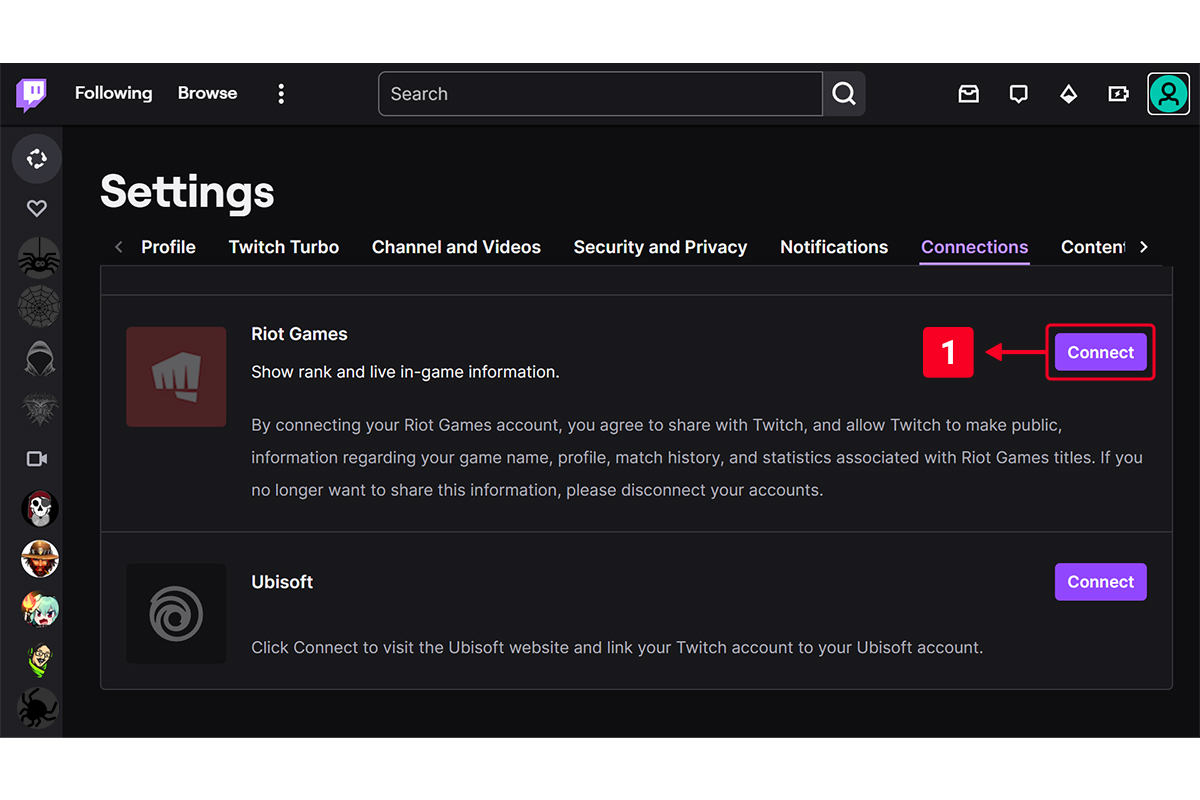
- 이동하다 트위치 → 설정 → 연결
- 올바른 게임 계정이 연결되어 있는지 확인하세요.
- 필요한 경우 연결을 해제했다가 다시 연결하세요.
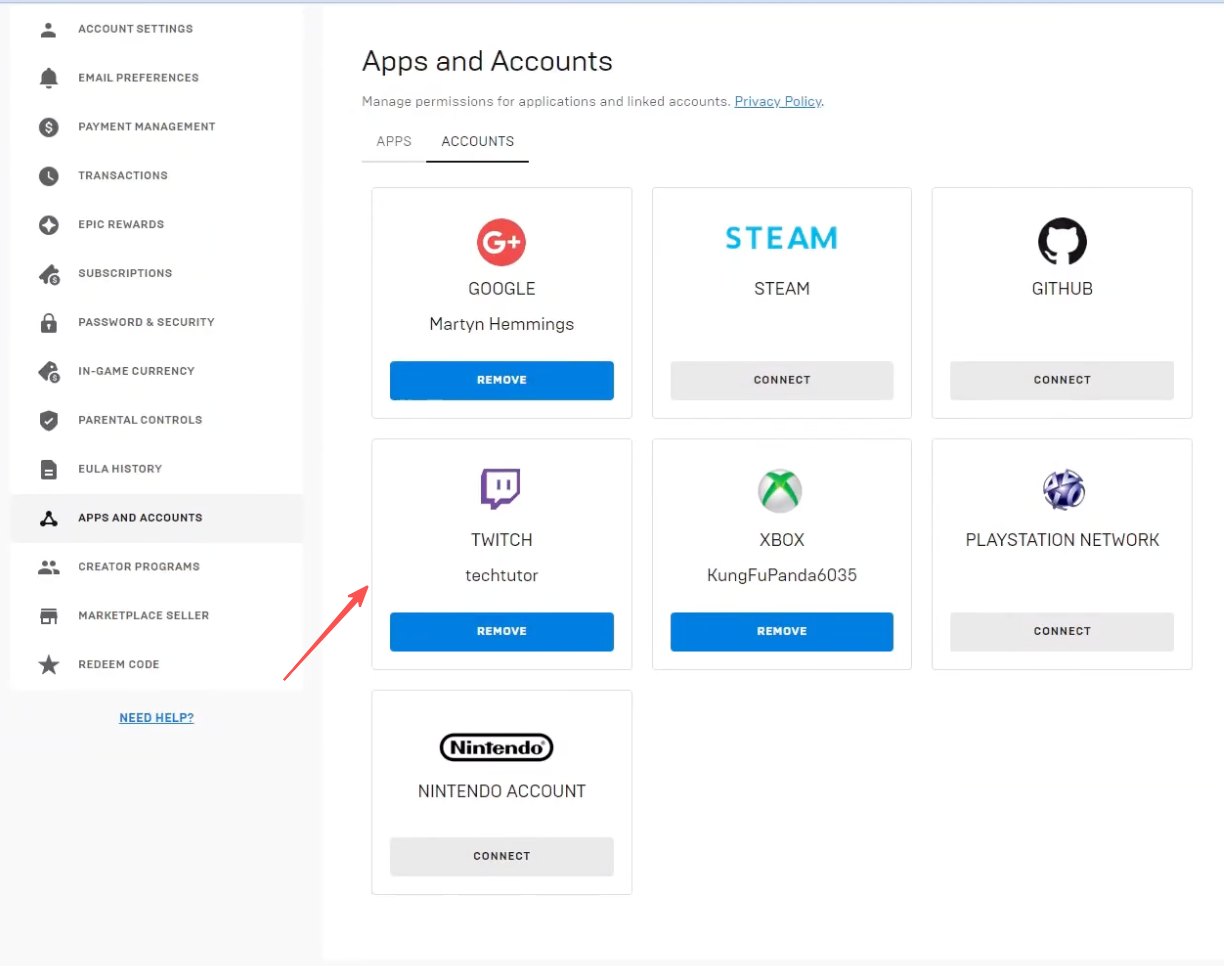
- 트위치를 게임과 연동할 수도 있습니다.
4.2 청구 취소 수동 처리
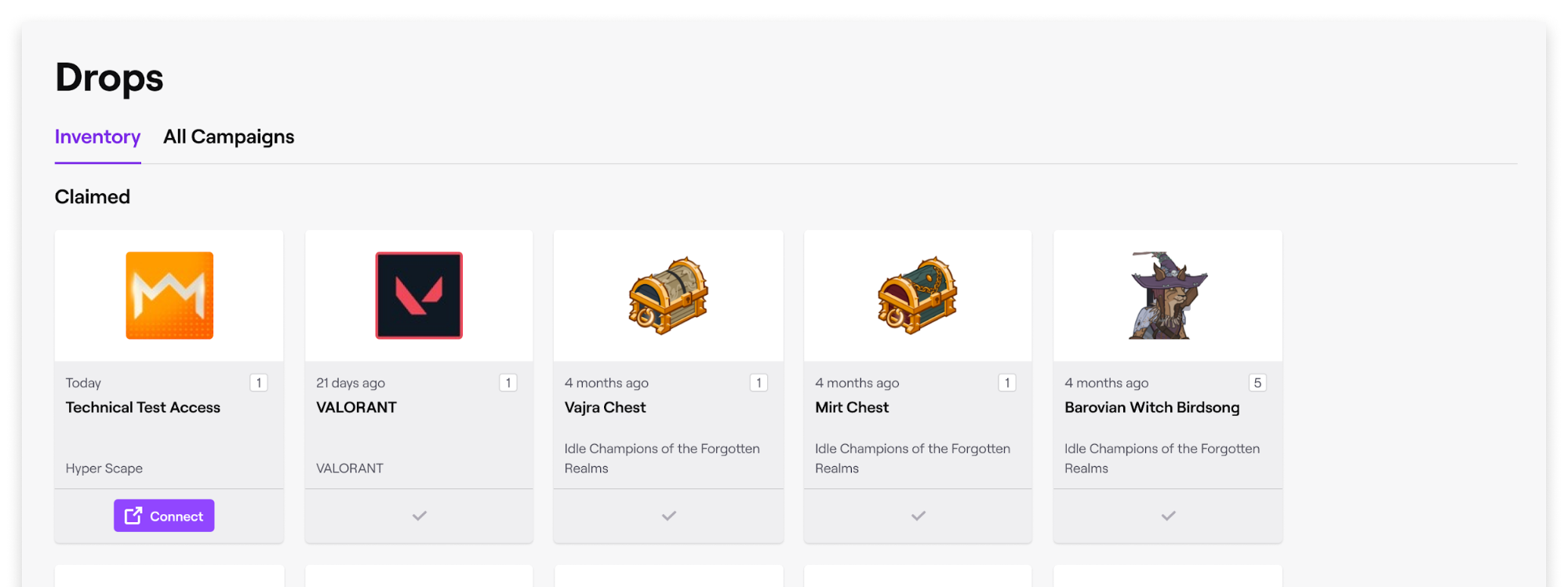
이동하다 트위치 → 드롭스 → 인벤토리 드롭이 표시되면 "주장됨" 버튼을 클릭하세요. 미수령 아이템은 게임에 나타나지 않습니다.
4.3 게임 재시작
Warframe, Valorant, Call of Duty 등 많은 게임은 로그인할 때만 인벤토리가 업데이트됩니다. 드롭을 획득한 후에는 게임을 재시작하세요.
4.4 스트림에 드롭 기능이 활성화되어 있는지 확인합니다.
공식 캠페인에 참여하는 스트림만 보상 지급 대상에 포함됩니다. 드롭을 확인하세요. "활성화됨" 꼬리표.
4.5 VPN 및 광고 차단기 비활성화
일부 VPN, 브라우저 확장 프로그램 또는 광고 차단 프로그램이 Twitch의 추적 시스템을 방해할 수 있습니다. 이러한 기능을 비활성화하고 페이지를 새로고침하세요.
4.6 탭을 활성 상태로 유지하세요
트위치 탭이 최소화되거나, 음소거되거나, 비활성화된 경우 시청 시간 추적이 일시 중지됩니다. 트위치 탭이 항상 열려 있고 활성화된 상태인지 확인하세요.
4.7 지역 제한 사항을 준수하십시오
일부 드롭은 특정 지역에서만 진행됩니다. 해당 캠페인이 귀하의 지역에 적용되는지 확인하십시오.
4.8 두 계정 모두 다시 로그인
Twitch와 게임 계정에서 로그아웃했다가 다시 로그인하면 동기화 문제를 해결할 수 있습니다.
5. 보너스: Twitch 라이브 스트림 녹화 기능 Swyshare Recordit
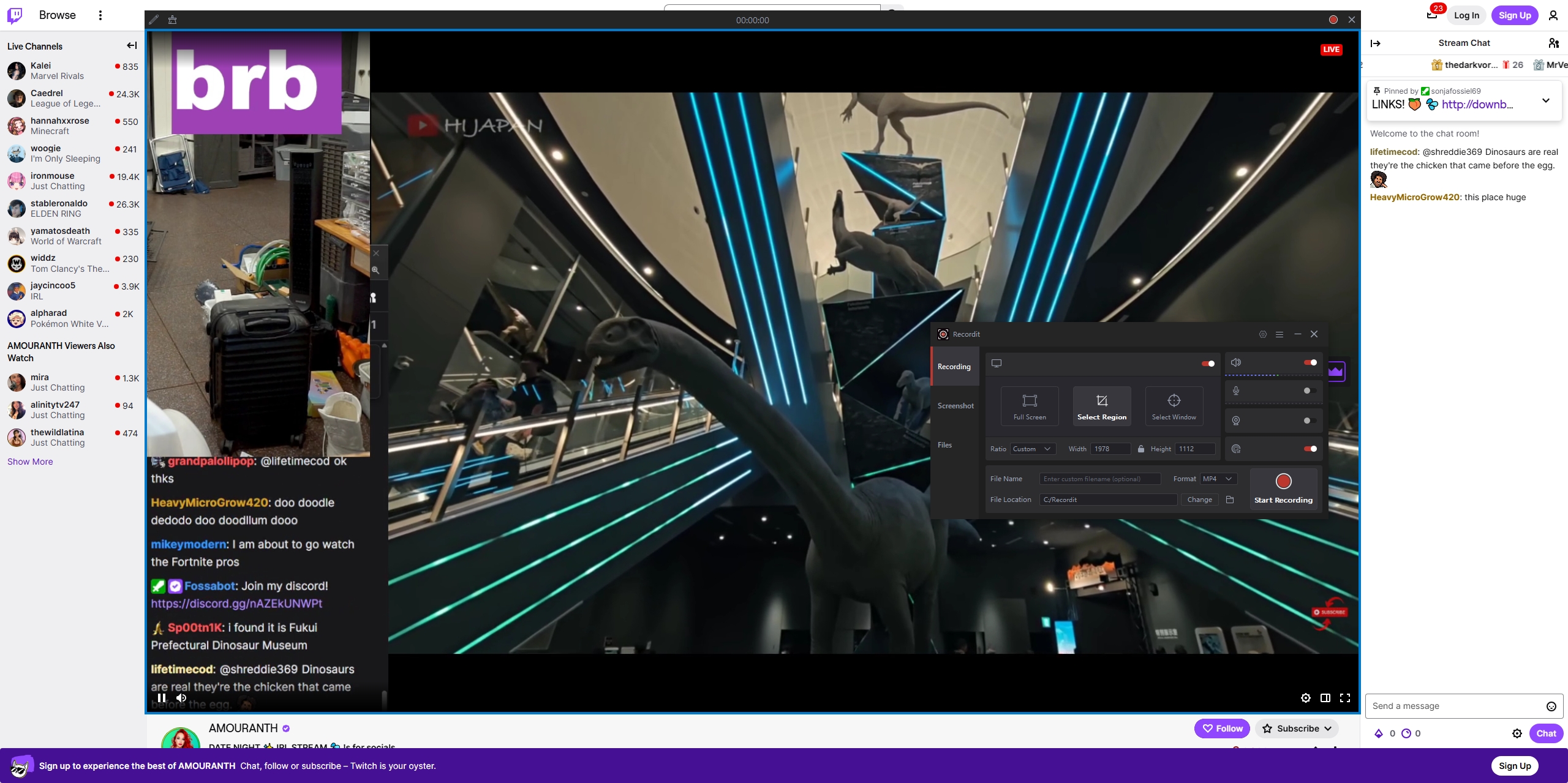
트위치 스트리밍을 시청하며 드롭스를 얻거나 재미를 찾으시나요? 그렇다면 다음 내용을 확인해 보세요. 스트림을 기록하세요 주요 내용, 튜토리얼 또는 이벤트 취재를 위해. Swyshare Recordit 이 프로그램은 트위치 라이브 방송을 캡처하는 데 사용할 수 있는 가볍고 사용하기 쉬운 도구입니다.
주요 특징 Swyshare Recordit :
- 고화질 트위치 스트림 녹화
- 즉시 재생: 언제든지 마지막 15초, 30초, 60초 또는 그 이상의 장면을 캡처할 수 있습니다.
- 무인 세션에 대한 예약 녹화
- 전체 화면, 영역 또는 창 녹화
- 오디오와 웹캠 영상을 모두 녹화하세요.
- MP4 또는 기타 인기 형식으로 빠르게 내보내기
- 내장 비디오 편집기: 촬영 후 크기 조정, 로고 및 배경 추가
6. 결론
트위치 드롭스는 좋아하는 스트리머의 방송을 시청하는 것만으로 게임 내 보상을 쉽게 획득할 수 있는 방법입니다. 드롭스 작동 방식을 이해하고, 계정을 올바르게 연결하고, 보상 수령 모범 사례를 따르면 대부분의 일반적인 문제를 피할 수 있습니다.
트위치 이용 경험을 한 단계 더 발전시키고 싶은 분들을 위해, Swyshare Recordit 이 앱을 적극 추천합니다. 라이브 스트림 녹화, 하이라이트 저장, 녹화 예약 기능을 통해 중요한 이벤트나 드롭스 기회를 절대 놓치지 않도록 해줍니다.
이러한 팁과 도구를 활용하면 트위치 드롭스를 원활하게 이용하고 좋아하는 스트림에서 소중한 모든 순간을 포착할 수 있습니다.